Two US health systems lost digital services to cyberattacks in the last week of October 2026. If your hospital management software runs on your own server, you can cut the internet link and keep treating patients, but only if you’ve planned which tasks still need the outside world. Here’s what happened, and a downtime plan you can test this month.
What happened at University Hospitals and UNM Health
University Hospitals in Cleveland spotted unusual activity on its servers on Thursday, 22 October. Its response was blunt: it disconnected its systems from the internet. More than a week later, its MyChart patient portal and several other digital services were still offline, and the notice gave no estimated finish date. Payments couldn’t be taken at the time of service, and results from its specialty labs were only available through provider offices.
Yet the hospital kept working. An internal letter reported by 3News on 30 October said nearly 97% of appointments and procedures had gone ahead. Prescriptions were written, faxed or phoned in. Staff rang patients to confirm their bookings, as Cleveland19 confirmed on 28 October.
The University of New Mexico’s health system had a shorter and sharper day. On Monday, 26 October, an attack forced it to divert ambulances and limit new patients between 12:30 and 2:30 pm, and every clinic appointment and outpatient surgery was cancelled for the rest of the day. UNM says the attack “affected some end-user devices but did not penetrate core systems or servers,” and that it made no concessions to the attackers. Critical systems were back the next morning. A group calling itself BYOD claims to have hit 36,000 machines and stolen data, including EHR rosters. None of that has been confirmed.
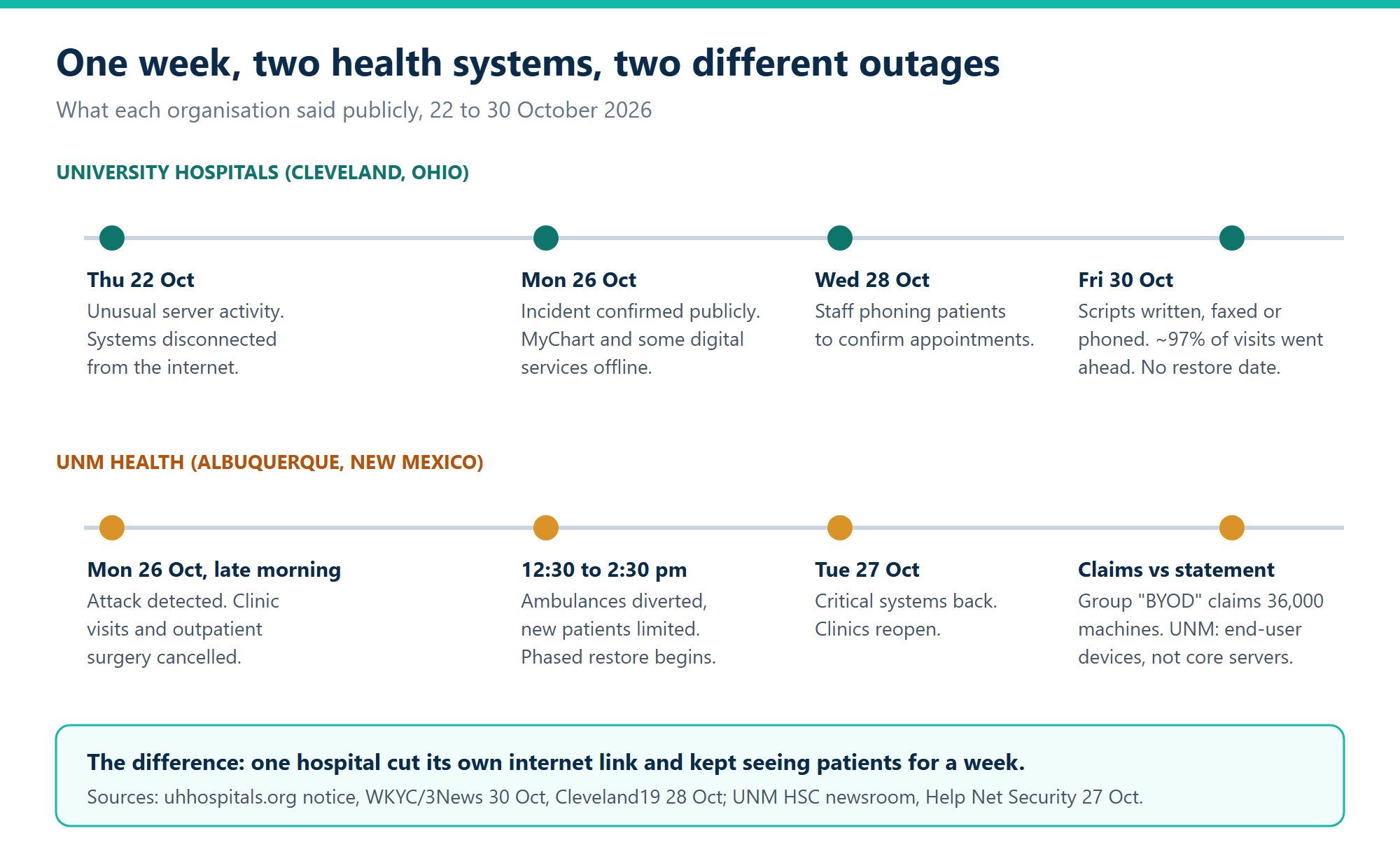
Two outages a few days apart. One hospital unplugged itself and kept seeing patients; the other lost a day of clinics and got its systems back fast.
Disconnecting is the first move. Is your hospital management software ready for it?
Pulling the internet link is the oldest containment step there is. It cuts an attacker’s remote control and buys time. What it does to your hospital depends almost entirely on where your systems live.
When the hospital management software is a cloud service, cutting the link cuts off the records too. You’re on paper from the first minute. When it runs on a server in your own building, the picture changes. Reception, wards, the lab and the pharmacy talk to that server over the local network, and none of that traffic needs the internet.
We’d argue that’s the strongest practical case for self-hosting a hospital system, and it isn’t about security as such. Running your own server doesn’t make you harder to attack. It makes the off switch yours, and it means switching off the outside world doesn’t switch off patient care.
One honest caveat. All of this assumes the server itself is clean. If the attacker is on the machine that holds your records, keeping it running is the wrong call. Isolate first, check, and only then decide.
What still needs a path out
Here’s where most clinics get caught. A self-hosted system still reaches outside in quieter ways, and each one fails on the day you unplug.
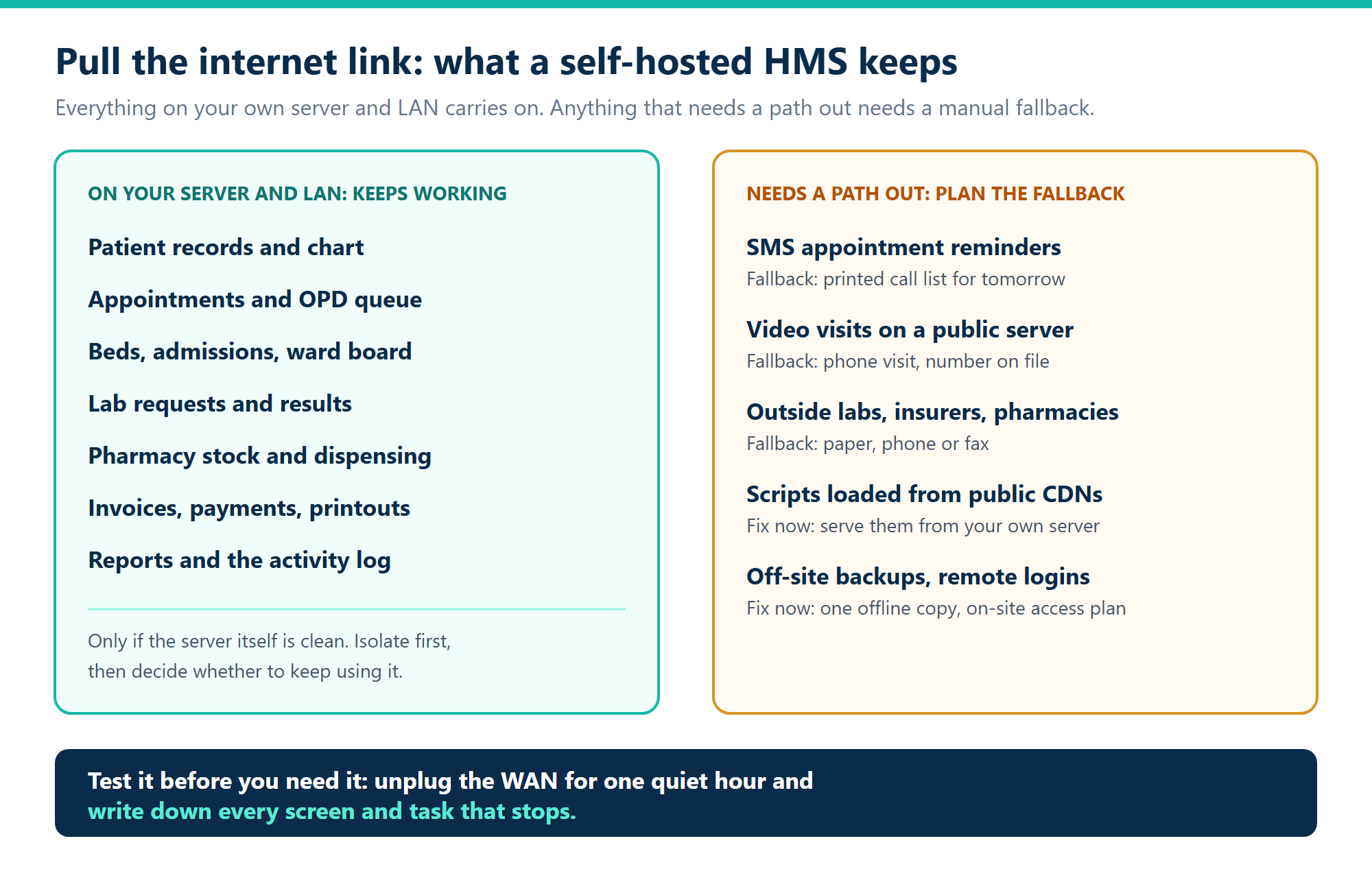
Anything that lives on your own server and LAN carries on. Everything on the right needs a fallback written down before the day it’s needed.
- Text message reminders. They go out through an SMS gateway and a carrier. Print tomorrow’s appointment list every evening during an incident and call people, exactly as University Hospitals did.
- Video visits. If your video calls run on a public server, they stop. Keep a phone number for every patient booked for a video visit.
- Outside partners. Reference labs, insurers and outside pharmacies all sit beyond the firewall. Agree paper, phone or fax routes with each one now, while you’re not in a hurry.
- Remote access. Doctors who log in from home lose access when the link goes. Decide who needs to be on site and how they’ll be told.
- Off-site backups. They’re useless if every copy sits behind the link you just cut, or on a share the attacker can reach. Keep at least one recent copy offline.
A downtime kit for a small hospital or clinic
Big systems have downtime teams. A 40-bed hospital has a manager and a printer. That’s enough, if the kit exists before the attack.
Print the ward board and current admissions at every shift change. In ICTHospital the bed management module works out which beds are free from the open admissions, so a printout taken at 7 am is a true picture of who’s in which bed. Keep tomorrow’s appointment list on paper too, with phone numbers.
Pre-number your paper forms. Registration, vitals, prescriptions, lab requests and receipts should each carry a number you can match to the system later. Without that, re-entry turns into guesswork and duplicate patients.
Write down who decides. Someone has to make the call to disconnect, and someone else has to make the call to reconnect. At 2 am, a name on a laminated card beats a meeting.
Then test it. Unplug the internet connection for one quiet hour, say a Sunday afternoon, and have staff carry on. List every screen and task that stops.
Getting back: reconciliation is the slow part
University Hospitals said it was validating that systems were safe before reconnecting to partner sites. That order matters. Reconnect the outside world last, after you’ve checked the server, and after the paper records from the outage are back in the system.
Re-entering a few days of paper is tedious but manageable if the system doesn’t hold totals that drift. ICTHospital’s reports, such as outstanding lab work, aged debtors and bed occupancy, are worked out from the records when you open them, so once the paper is entered they’re correct without a rebuild. The report management page explains how each one is built. Administrators can also check the activity log afterwards to see which user did what, and when.
Be clear about the limits. ICTHospital doesn’t ship its own backup tool and doesn’t have two-factor login in this release. Database backups are your job, using the standard tools for MySQL or MariaDB, and the logins are only as strong as the passwords and network rules you set around them.
Want to see how it behaves before you plan around it? Try the live ICTHospital demo with the reception, doctor or accounts logins, or read the user guide.
Frequently asked questions
What happened in the University Hospitals cyberattack?
University Hospitals in Cleveland detected unusual server activity on 22 October 2026 and disconnected its systems from the internet. MyChart and other digital services stayed offline for more than a week, but about 97% of appointments and procedures went ahead using phone, fax and paper.
Was UNM Health hit by ransomware?
A group called BYOD claimed the 26 October attack and says it compromised 36,000 machines. UNM hasn’t confirmed that. It says some end-user devices were affected but core systems and servers weren’t, and that it made no concessions.
Can hospital management software work without internet?
If it runs on a server inside your building, the core work usually can: records, appointments, beds, lab, pharmacy and billing travel over your local network. SMS reminders, video visits, outside partners and remote logins still need a connection, so plan manual fallbacks for each.
Is self-hosted hospital software more secure than cloud?
Not by itself. You control the server, the backups and the off switch, but you also own the patching and monitoring. The real advantage shows up during an incident, when you can cut the outside link and keep working.
How often should a clinic run a downtime drill?
Once or twice a year is a reasonable start, and again after any big change to your systems. One hour unplugged, a list of what stopped, and a fix for each item before the next one.
Sources: University Hospitals cybersecurity incident notice (uhhospitals.org); 3News/WKYC via Yahoo News, 30 October 2026; Cleveland19, 28 October 2026; UNM Health Sciences Center newsroom, 26 to 28 October 2026; Help Net Security, 27 October 2026.